



Leave your dusty photo albums in the attic. Gone are the days of carrying a physical box with you to show people. Thanks to the explosion of free photo sharing sites, your memories have become digital resources that can be accessed from anywhere. No more physical stacks of shiny paper to share moments with friends and family. All you need is an internet connection.
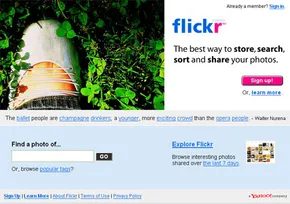
Organizing physical photos used to take hours to upload batches of photos, but now it only takes minutes. If you want a tangible keepsake, you can pay a small fee to have a high-quality print delivered to your home or printed on archival stock. But the core experience is digital. Most of these platforms are free, but they lure you in with premium tiers because they offer more storage, higher bandwidth, and advanced features. Flickr is a giant and one of the biggest players in the game, but it’s not the only option. Competition is fierce and many websites offer almost the same features for similar price points.
There are basically three things that photo sharing sites do. Upload files, organize them and share them with others. Sounds simple. It’s not always easy. The first hurdle is uploading.
Most sharing sites handle this through a web interface with a “Browse” button. Click on it. A window opens. Browse your hard drive and select your files. Most interfaces allow you to retrieve multiple photos at once, saving you the hassle of clicking through folders one by one. Then you wait. The upload progress bar crawls and is determined by two factors: the number of images and the file size. The high-resolution JPEG files of modern SLRs eat up your bandwidth faster than you think. If you’re uploading hundreds of images, you’ll probably be staring at your screen for a while.
Some platforms also offer desktop apps or email-based upload methods that bypass browser limitations. For example, Flickr supports uploading via email and has previously supported direct import from devices connected to certain cameras. This is very useful if you are technical enough to create a script that auto-upload from your phone to a cloud folder.
The site may resize images before they appear in the gallery. Why? Save server space and keep pages loading fast. Most free accounts receive a minified version of the original file that is optimized for online viewing. This is often suitable for sharing on social media or sending a link to relatives. However, if you need full resolution for original printing or professional use, you’ll usually have to pay for a premium membership. This is the classic freemium model. Use the tool for free and pay for the raw data.
Once the images are up, the actual work begins. You have to make them findable. This is where Photo Categorization and Tagging comes in handy. Without structure, a digital library is just a dump of files. With it, you create a searchable archive.
Organize your visual library
Uploading is just the first step. The real work starts when you start sorting. You can categorize, group and annotate your files. How you do this depends entirely on the platform you choose.
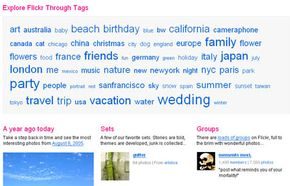
Some websites use tags. These are simple keywords that you can attach to each image. They act as filters. When visitors view your gallery, they often see a tag cloud. The more pictures there are in the category, the bigger the sticker will appear. This is the visual hierarchy.
This makes discovery intuitive. Users looking for specific content can combine tags. Just want to see horses on your summer trip? Filter by “horses” and “holidays”. The results update instantly.
Other sites prefer sets. This approach allows for tight control. You define the order. Visitors view the images in a certain order, like a slide show. Some platforms also have their own slideshow mode. It feels like it was carefully planned.
An explanation adds depth. You can write as much or as little as you want. Mention the camera model. Note the location. Share the story behind the shot. The way images are recognized varies depending on the context.
Hidden data in files
You may not realize it, but your camera is already telling a story. Digital cameras embed metadata directly into image files. This is called EXIF information (Exchangeable Image File Format).
When you upload an image, this information usually goes with it. This includes the camera model, shutter speed, aperture and ISO. The exact date and time of the image is also saved.
This saves time. There is no need to enter technical data manually. The file provides them.
However, privacy is a consideration. This information tells you exactly when and where the picture was taken. If you don’t want this kind of transparency, you can disable EXIF data before uploading. Most major sharing sites allow you to change this easily.
“Most digital cameras encode information about the photo and the camera itself into the image file and can include that information automatically.”
The choice is yours. Let the metadata speak for itself or remove it to ensure anonymity. Either way, organizational tools can help manage clutter.
Uploading an image is not a binary choice between “publish” or “disappear”. This is a set of permission settings that determine who can actually see your work. Most platforms allow you to show or hide individual photos. Public means that anyone who receives the link can see it, even people who search your site. Private Strictly restricts access to users you have specifically allowed.
The nuances are somewhere in between. Some services consider “private” to be “visible to your entire friends list”. Some offer fine-grained control. You can group your contacts by context. Let’s say you have a folder with pictures of natural scenes and another with pictures of chaotic family parties. You might want all your friends to see this view, but you might not want your coworkers to see your reunion photos. You can create specific categories for colleagues and exclude them from albums. This way you can avoid awkward moments like when your boss sees a photo of you with blue face paint at a party three years ago.
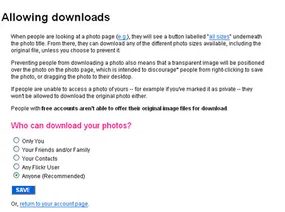
Then there is the downloading issue. You can disable the download button for specific photos or your entire profile. The goal is to prevent regular users from saving high-resolution files to their desktop. But let’s be honest about the technical realities. If the image appears on someone’s screen, it is technically already on that person’s computer.
Services like Flickr are trying to increase friction. When someone tries to save a photo, a transparent image will appear over your photo. This prevents you from right clicking and saving. You cannot prevent anyone from trying to extract your files. Enthusiastic users can bypass these barriers. The barriers are psychological, not technical.
Digital photo printing and Premium membership
After managing visibility, consider the following: Many users don’t just want to share. They want to print. Digital files are flat. Physical photographs have weight, texture and permanence.
Premium membership is often tied to this. Free accounts often have storage limits or lower resolution limits. The upgrade may enable higher quality printing or the ability to use third-party printing services directly through the platform. It is a monetization strategy. The company profits from your desire to make their digital memories tangible.
But the value proposition is not just paper. It’s about control. When you pay a premium, you generally buy a more robust ecosystem. Improved search tags. More privacy options. Browse without ads. Yes, you can get even better print discounts. Whether it’s worth it depends on how much you trust the platform as your primary archive. If you’re using it for casual sharing, free may be enough. If you treat it as your digital photo album, and the extra features might make it worth subscribing.
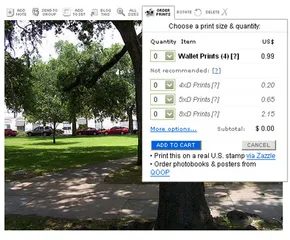
You can get hard copies of your digital photos without leaving your desk. Most photo-sharing platforms let you order physical prints directly from their site. Sometimes the platform handles the printing itself. Other times, they partner with a third-party lab. The options vary wildly depending on the service you choose.
Shipping is the standard route. You pay for the prints, and maybe shipping too. The photos arrive at your door in a mailer. But you don’t have to wait for delivery. Some sites have partnerships with physical retail stores. You pick a nearby location online. Then you just walk in and grab your photos. It is faster. It skips the postal delay.
Customization is where these services get interesting. You aren’t stuck with a raw JPEG. Many platforms let you design around the image. Add a matte border to frame the shot. Tack on text. Maybe some clip art. You can turn a vacation snap into a holiday card. It takes five minutes. It feels tangible in a way a screen never does.
Price is the other factor. Digital printing is cheap. Really cheap. You will often find deals for six cents per print. Some sites even throw in free prints when you sign up. That is a loss leader to get you hooked. Standard rates usually hover between twelve and twenty cents per print. It is inexpensive enough that you might print a whole album.
Most of these sites operate on a freemium model. You can join for free. Upload your photos. Share them with friends. But the free tier has teeth. It has limits.
Why Upgrade to a Premium Photo Sharing Membership?
If you are serious about your photos, the free version gets annoying fast. Premium memberships cost a monthly or annual fee. That fee buys you more than just bragging rights. It removes the friction.
Upload bandwidth is the first casualty for free users. You might hit a cap after a few dozen high-res images. Premium members often get unlimited uploads. Or at least, a cap that is high enough to not matter. You stop counting photos. You just upload.
Ads are another nuisance. Free users see banner ads. They clutter the interface. They distract from the content. Premium members get an ad-free experience. The site stays clean. The photos stay the focus.
Then there is the quality of the image itself. Free users often get a compressed thumbnail. You might want the full-resolution file. The original data. Premium accounts frequently unlock access to full-size, high-quality versions of every image. You can download them. Archive them. Print them at large sizes without pixelation.
Personalization extends to your site’s address too. Free users might get a generic string of numbers or a forced subdomain. Premium members often get a custom URL. Something like http://www.photosite.com/yourname. Or a clean subdomain like http://yourname.photosite.com. It looks professional. It is easier to share.
These features are not universal. Each site defines its own premium tier differently. Some might offer cloud storage bonuses. Others might prioritize print discounts. You have to check the fine print. But the pattern is consistent. You pay to remove limits. You pay for speed. You pay for quality.
Photo Sharing Communities
Beyond the storage and the prints, there is the social layer. These sites are communities. They
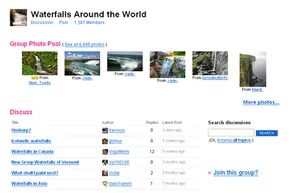
The convenience of using digital archives is only half the story. Modern photography platforms have evolved into a living ecosystem where amateurs and professionals interact with each other. This social layer turns a simple gallery into a feedback loop of critique, friendship and guidance.
Some platforms prefer this interaction. They build tools for groups, manage contacts and threaded comments. This structure not only brings people together but also democratizes photography. It democratizes photography. Great photos taken with a $60 budget camera often get the same recognition as photos carefully practiceed with $1,500 professional equipment. Devices become irrelevant. Skill will be the key.
Community and convenience
Not all websites with upload button are created with photographers in mind. Popular social networks like MySpace and Friendster allow users to dump photos to their profiles, but the infrastructure is an afterthought. There are no effective organizational tools. There is no sophisticated tagging systems. It’s just a stream of images buried under life updates.
The difference is important. If you’re looking for a community, you need a platform specifically designed for that purpose. Sites like Flickr offer features related to photo workflows. They understand that they need to organize by location, event or lens type. They understand that you don’t just want to post a selfie, you want to discuss exposure settings.
The Death of the Physical Album
The transition to an online service has fundamentally changed the way memories are shared. Remember the plastic photo albums you drag over to family dinners hoping no one spills coffee on the glossy prints? Those days are practically over.
Now, you point a friend to a URL. Done. Friction is eliminated. If you still need physical artifacts, this technology allows for later on-demand printing. However, the primary form of sharing has become immediate and digital. This accessibility lowers the barrier to exhibiting your work. No need for a darkroom. You don’t need to gallery opening. All you need is an account and a good connection.
Related Reading
Your choice of platform often comes down to what matters most to you, such as privacy, community, and ease of use.
What is the best free photo sharing site?
There is no single winner. The “best” choice depends entirely on your goals.
– Flickr: Strong community features and is perfect for serious hobbyists.
– Imgur: Fast, anonymous and focused on viral sharing rather than portfolio building.
– 500px: Curated quality, popular among professionals looking for exposure.
– Picasa: (Historically significant for its organization features and is often mentioned in old discussions, although now largely replaced by Google Photos).
– SmugMug: Provides strong privacy controls and print sales capabilities.
What do you mean by photo sharing?
Simply put, it’s the practice of uploading digital images to the web for others to view, download or practice. These range from private backups to public galleries. While platforms like Instagram and Snapchat dominate the mobile/social side, Flickr and 500px cater to the hobbyist and professional markets.
What is the easiest photo sharing site?
Ease of use is subjective.
– Flickr is intuitive for those who want organization.
– Picasa (in its heyday) was praised for its automatic face recognition and creation of photo albums.
– ImageShack offered a no-frills approach for quick uploads.
Most major platforms now streamline their interfaces with “ease of use” as a fundamental expectation. The differentiating factor is often the depth of the community or the quality of image practiceing.
Related Reading
For a closer look at the hardware and software behind these images, consider the following:
- How a digital camera works
- Digital Photography Basics
- How the camera works
- How the autofocus camera works
- How the camera flash works
- How Photographic Film Works
- How the scanner works
- Why are there so many different image formats on the Internet?
- Why are my digital photo files so large when photos on other sites are much smaller?
Other resources
- Flickr
- Shutterfly
- Smugmug
- Wired News: Photo Sites Share and Share Alike
Sources: John Sparks and Karen Springen. “A Digital Photo Finish.” Newsweek, July 24, 2006.