





You leave your computer running overnight. It’s just sitting there, idling, burning electricity while you sleep. That wasted potential isn’t just a bill; it’s a missed opportunity for medical breakthroughs. Folding@Home changes that equation. It turns your dormant processing power into a distributed supercomputer dedicated to understanding how proteins fold.
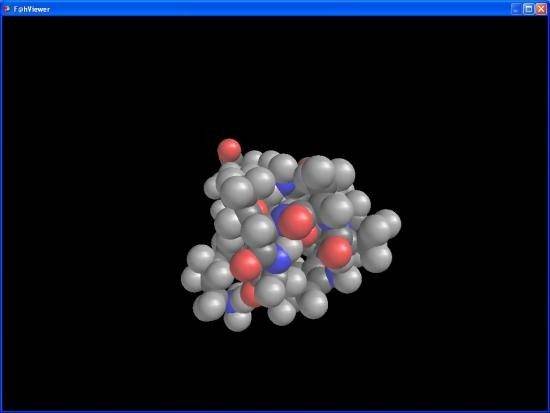
This isn’t just about recycling old hardware. It’s about solving biological puzzles that traditional supercomputers simply can’t crack fast enough. The project, launched by Stanford University in 2000, has grown into one of the largest volunteer computing networks in the world. Millions of users contribute cycles to simulate protein folding, a fundamental process in biology. Misfolded proteins are linked to Alzheimer’s, various cancers, and even the mechanics of the SARS-CoV-2 virus. By understanding these structures, researchers hope to find new therapeutic targets and design better drugs.
The Science Behind the Idle Cycles
Traditional biomedical research often relies on massive, expensive centralized supercomputing clusters. These are powerful, yes, but they are also scarce and costly. Folding@Home takes a different path. It aggregates the CPU and GPU power of millions of personal devices into a single, massive computational resource.
How does it work? Complex protein simulations are broken down into tiny, manageable chunks of data. These “work units” are distributed to thousands of connected computers. Each machine performs a specific calculation and sends the results back to the central servers. This distributed model accelerates research significantly while making high-end scientific contribution accessible to anyone with an internet connection.
The platform democratizes access to scientific advancement by leveraging existing hardware rather than requiring new infrastructure.
This collaborative model represents a shift toward open science. It values the sharing of knowledge and resources. Users aren’t just passive observers. They become active participants in the discovery of key molecules and therapeutic targets. The impact is tangible. Every cycle contributed helps model disease processes more accurately.
Installation and System Compatibility
Getting involved requires no technical expertise. The software is free. There are no commercial licenses. No student editions. Just a straightforward download and install.
The developers support the major operating systems. You can run Folding@Home on Windows 7 through Windows 11. macOS users are covered as well. Linux distributions are also supported, ensuring broad compatibility across most home and office hardware.
Mobile devices, however, are a different story. There is no official client for Android or iOS. This isn’t an oversight. It’s a technical limitation. Mobile CPUs lack the sustained processing power needed for these heavy simulations. Battery management policies on phones also restrict long-term, high-load background tasks. Security protocols on mobile platforms further complicate the requirement for unrestricted network access. So, stick to your desktop or laptop.
Setting Up Your Contribution
The installation process is minimal. Download the installer from the official Folding@Home website or a trusted mirror like Futura-Science. Run the file. Follow the prompts. It’s that simple.
Once installed, the client runs in the background. It’s designed to be unobtrusive. The software monitors your system’s activity. If you start gaming or editing video, Folding@Home scales back its resource usage automatically. It won’t freeze your system. It adapts to what’s available.
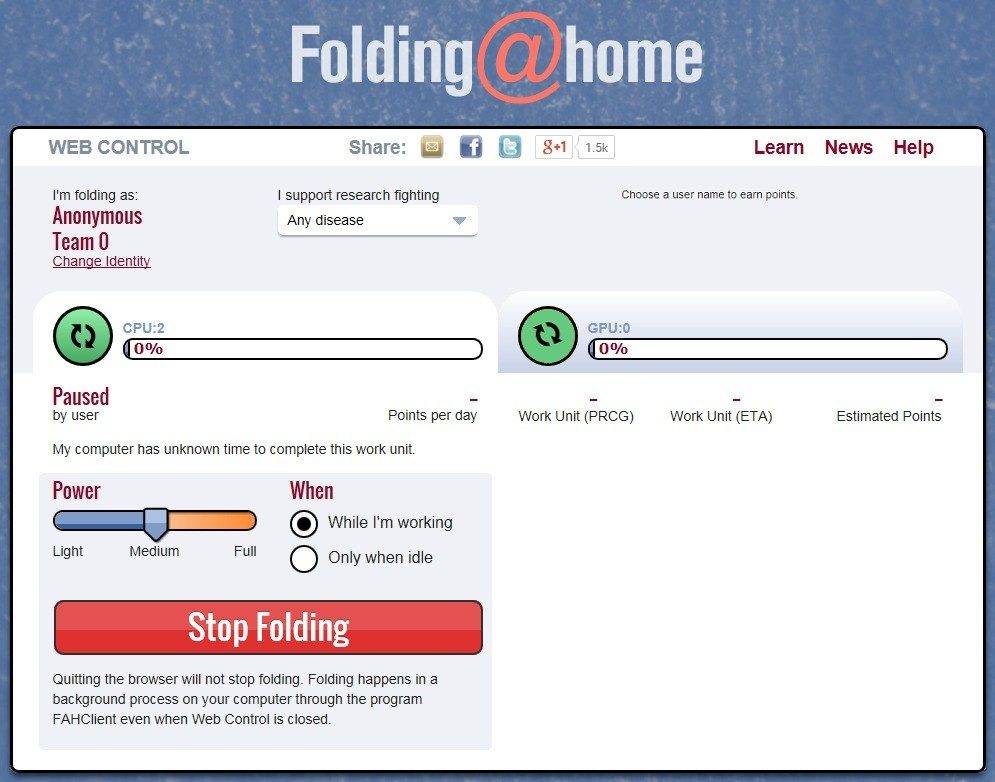
Users can choose to participate anonymously or register. Registration allows you to track your contribution stats and join teams, but it’s not mandatory. For advanced users, there are settings to adjust priority or force specific task types. But for the average user, the defaults work fine.
Updates are regular and automated. They ensure stability and add new features. You can also check the version history or force an update manually if needed. The developers keep older versions available for compatibility, which is helpful for specific research environments that might require legacy configurations.
Why This Matters for Everyday Users
You might wonder if your contribution actually makes a difference. One computer running Folding@Home alone won’t stop a pandemic. But millions of them working in parallel? That changes the scale of what’s possible.
This model bypasses the bottlenecks of traditional supercomputing. It utilizes hardware that already exists. It turns passive consumption into active contribution. When you run the software, you aren’t just saving energy; you’re helping scientists map the molecular structures of diseases.
The barrier to entry is low. The impact is high. And the process is invisible. You barely notice it running, yet the results are being sent back to labs worldwide every second. It’s a quiet revolution in biomedical research, powered by the idle cores in your machine.
What happens when those results finally translate into a new treatment? We’ll see. The data is being processed right now. The next breakthrough could depend on the cycles you provide tonight.
Folding@Home vs BOINC: Why Specialization Wins for Medical Research
You’ve probably heard of BOINC. It’s the granddaddy of distributed computing, the Berkeley Open Infrastructure for Network Computing. It’s modular. You can crunch numbers for seti@home, fold proteins with Rosetta@home, and maybe simulate gravitational waves all at once. It’s a Swiss Army knife of scientific utility.
Folding@Home doesn’t want to be a Swiss Army knife. It’s a scalpel.
While BOINC spreads its volunteer power thin across dozens of disparate projects, Folding@Home bets everything on one thing: protein folding. Specifically, how these complex biological machines twist, turn, and interact. This isn’t just a preference; it’s a strategic choice that has carved out a distinct niche in the biomedical landscape. By focusing exclusively on protein dynamics, the project has built deep, specialized expertise that generalist platforms simply can’t match. When you need to understand the mechanics of a disease at the molecular level, you don’t need a platform that does everything. You need one that does this thing relentlessly.
Is Folding@Home Safe and Easy to Run?
Let’s address the elephant in the server room: security. Running software that taps into your CPU or GPU feels risky. It shouldn’t be, but it feels that way. Folding@Home uses established, robust security protocols. Your data stays confidential. Your system integrity is protected. You aren’t inviting strangers into your digital home; you’re sending encrypted packets of calculation to a central brain.
And no, you don’t need a PhD in computer science to join in. The barrier to entry is remarkably low. The software comes with a graphical interface that handles the heavy lifting. You can set your preferences. You can monitor your contribution. It’s plug-and-play for science.
For those who want to dig deeper, the support structure is surprisingly robust. There’s comprehensive documentation. Active forums where veterans help newcomers. A responsive community. They even host webinars to explain the biophysics behind the simulations. You don’t need a university degree to participate. You just need a computer and an interest in seeing results. Some institutions might even recognize your volunteer hours as civic engagement, which is a nice nod to the value of your time.
It’s Free. Because It’s Civic Duty.
Here is the bottom line on cost: Folding@Home is free. Period.
There are no tiers. No premium subscriptions unlocking faster speeds. No paywalls for advanced features. This isn’t a product; it’s a civic engagement. You are donating your idle computing cycles to the advancement of medical knowledge. Every watt of electricity you use helps researchers simulate molecular interactions that would otherwise take supercomputers months to crack.
This model of participatory science bridges the gap between the laboratory and the living room. It democratizes access to high-performance computing. A student with a modest laptop contributes just as much as a researcher with a server rack. The collective power of thousands of modest contributions accelerates discoveries that single labs simply cannot afford to pursue independently.
The Real-World Impact of Collective Power
Why does this matter beyond the abstract? Because diseases like cancer, Alzheimer’s, and rare genetic disorders are driven by misfolded proteins. Understanding how these proteins behave is key to developing treatments. Folding@Home provides the computational muscle to simulate these behaviors at a scale previously unimaginable.
The success of the project lies in its global community. It’s not just about raw power; it’s about diversity of thought and engagement. By involving the public, the project fosters a culture of transparency and shared knowledge. It reminds us that science isn’t just something that happens in white coats behind closed doors. It’s something we can all touch, contribute to, and benefit from.
The impact is measurable. New therapeutic approaches are emerging faster. Complex pathways are being mapped out. All powered by the idle seconds of your machine.
So, where do you go from here? The tools are there. The information is open. The need is urgent. You can run the software. You can join the forums. You can watch the data flow in. Or you can just let it run in the background, a silent contributor to a larger whole.
It’s a choice. One that requires no money, just a little bandwidth. And maybe a curiosity about what your computer can do when it’s not just streaming video or rendering images.
Folding@Home system requirements and how it actually runs
Folding@Home isn’t just another background process hogging your RAM. It’s a distributed computing client designed for biomedical research, specifically protein folding simulations. The core mechanic is straightforward: you download work units, process them, and send the results back. The software prioritizes your CPU but leverages GPU acceleration whenever possible. This hybrid approach matters because GPUs handle the massive parallel calculations required for molecular dynamics far more efficiently than traditional cores.
The installation is native across Windows 7 through 11, macOS, and Linux. You need an x86-64 processor, which covers almost any machine built in the last decade. NVIDIA and AMD GPUs are both supported, provided your drivers are current. Outdated drivers are the most common reason for dropped work units or crashes. The application runs as a background service or daemon, meaning it doesn’t demand your attention. A web-based control panel lets you monitor progress and adjust settings without touching the main executable.
Internet connectivity is mandatory. You can’t fold proteins offline. The client fetches tasks and uploads results, but it doesn’t harvest your personal data. You can participate anonymously. A username and team number are optional luxuries, not requirements. You can add them later if you decide to join a competition or support a specific university lab.
Hardware demands and performance tuning
Performance hinges on your hardware. Recent GPUs see significant boosts in folding speed compared to CPU-only setups. However, this comes with a trade-off: resource consumption. The client gives you granular control over CPU and GPU usage limits. You can cap the percentage of resources dedicated to folding. This prevents your machine from becoming sluggish during gaming or video editing.
Scheduling is another key feature. You can set specific hours for folding, ensuring your PC is free for primary tasks during peak usage. A one-click pause button offers immediate relief if you need full system performance for a critical meeting or game session. Updates are deployed by the Folding@home Consortium, a partnership of universities and labs. You can choose between manual or automatic updates, though keeping the software current ensures access to the latest optimization algorithms.
Mobile support is notably absent. Android and iOS devices are not supported. The computational load and thermal management required for sustained protein folding simulations are currently beyond typical smartphone capabilities. This keeps the project focused on desktop and server-grade hardware where thermal headroom and power delivery are robust.
Privacy, licensing, and community structure
The license is straightforward. It’s free for non-commercial, volunteer use. The Folding@home Consortium funds and directs the scientific goals, but the computational power comes from volunteers. This model allows for massive scalability without the crippling costs of traditional supercomputing. Your contribution is essentially computational surplus.
Data privacy is preserved. The system doesn’t require personal identification. You are an anonymous node in a global network. If you choose to identify yourself, you can join a team. Teams compete in leaderboards based on the amount of computational work completed. This gamification element drives engagement but isn’t necessary for the science to proceed. The documentation is multilingual, though the interface remains in English. Community forums provide support in various languages, bridging the gap for non-native speakers.
Installation requires local administrative rights on most systems. Graphical drivers must be updated to ensure stability. The software is categorized under leisure and participatory science, reflecting its volunteer-driven nature. It’s not enterprise software. It’s a civic tool for computing enthusiasts.
Why your idle GPU matters
The real value of Folding@Home lies in its ability to utilize what would otherwise be wasted cycles. Modern GPUs spend most of their time idle or underutilized during standard desktop tasks. By redirecting that power, users contribute to solving complex biological problems. The science focuses on understanding how proteins misfold, a mechanism linked to Alzheimer’s, Parkinson’s, and various cancers.
The software adapts dynamically. If you start a heavy application, the client typically steps back, though manual adjustment is often preferred for absolute control. The web dashboard provides visibility into what your machine is doing. It shows current work units, health status, and contribution stats. This transparency builds trust. Users