




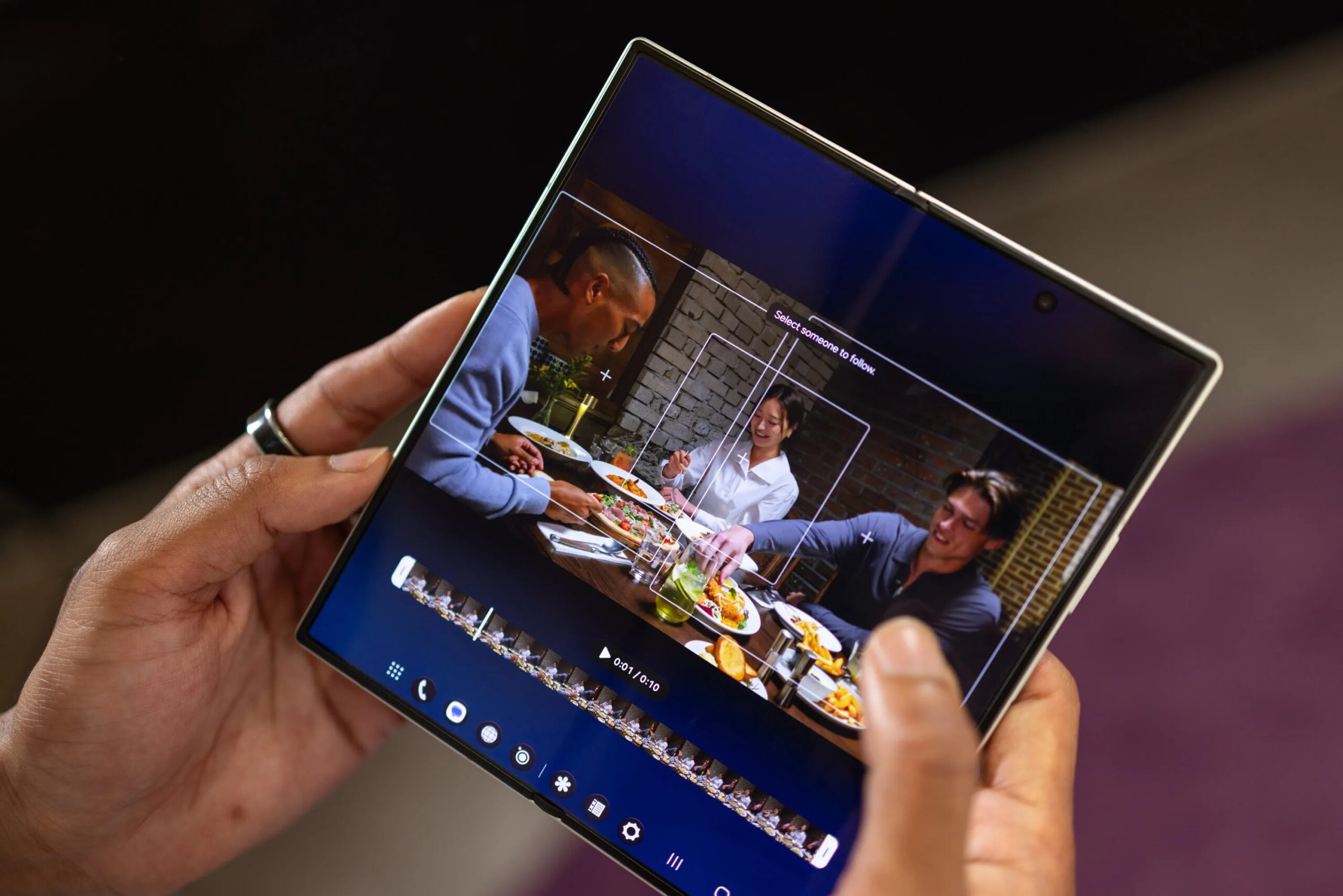
My FanCam is hands-down the best new Galaxy AI feature. Not because it’s mind-blowing tech. But because it isn’t making stuff up.
Past features like Sketch to Image or AI Eraser felt like magic tricks gone wrong. You ask for an object, and the AI hallucinates it into existence. You delete a photobomber, and the background warps. It creates a reality that doesn’t exist.
My FanCam? It just holds the line on a single person.
FanCams aren’t new. You’ve seen them everywhere — shaky, zoomed-in videos of celebrities at concerts. Apps existed to replicate the effect. But Samsung didn’t build a new app. They baked it directly into the Galaxy Z Fold 8, Flip 8, and Fold 8 Ultra. And now, it’s easier than ever to get that focused, action-style cut without the headache.
How My FanCam Works on Samsung Foldables
The feature launches exclusively on Samsung’s newest foldables. Yes, the Fold 8 Ultra gets it too. But expect it on the S25 and S26 once they hit One UI 9. For now, if you aren’t rocking a fold, you’re out of luck.
Here’s the workflow. It’s stupidly simple.
- Record a standard video.
- Open the Gallery app.
- Tap the Galaxy AI icon.
- Select My FanCam when the prompt appears.
The phone scans the clip. It finds the faces. You pick who you want to follow. That’s it.
You aren’t generating a new video file from pixels of noise. You are editing an existing one. The AI identifies a subject. It tracks their movement. It crops and stabilizes in real-time. No fabrications. Just framing.
Why This AI Tool Feels Different
There’s a general skepticism around AI image generation. It’s often creepy. Uncanny. We’re tired of pretending generated faces are real people.
My FanCam sidesteps this. It’s lightweight editing. It’s a digital cameraman who never blinks and never looks away. It ignores everyone else in the frame.
Think about it. How many times have you shot a group video and wished you could just zoom in on your friend without shaking your phone to death? Or maybe you wanted that intense, close-up perspective but the wide angle ruined it?
This tool solves that. You pick the subject. You pick the aspect ratio. Vertical 9:16 for TikTok. Square 1:1 for Instagram. Horizontal 3:4 for YouTube. The AI locks on.
The Privacy and Realism Factor
The biggest win here is honesty.
When you use a generative AI tool, you don’t know what’s real and what’s invented. My FanCam is transparent. It shows you the original frame. It shows you the tracking boxes. You see exactly what it’s following.
If the AI loses the subject? It stops. It doesn’t fake it.
My FanCam is fun because Galaxy AI isn’t creating anything out of the thin air; it’s just giving you closer look at who you want to star in your show.
You save a copy. You share it. No ethical dilemmas about deepfakes. No weird artifacts where a hand melts into a torso. Just a tight, stable shot of a human being.
What Comes Next?
Google will likely clone this. Apple will too. It’s the low-hanging fruit of consumer AI. Anyone with a decent video stabilization algorithm and object detection model can build it.
But Samsung got there first. And by keeping it strictly within the Gallery app, it feels like a tool. Not a gimmick. Not a marketing buzzword.
The rest of the Android ecosystem will watch closely. Will it come to the S24 Ultra? Probably later. But for now, you need the Fold 8 to play with it.
It’s a reminder that AI doesn’t always need to invent the world. Sometimes, it just needs to help you see it better.
Or differently.
That’s enough for now.