


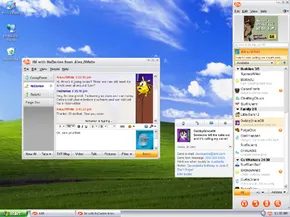
Instant messaging is so embedded in daily life now that we barely notice it. We take real-time text for granted. But back then, it was a novelty. Only a handful of pioneers introduced free, instant communication to the masses. AOL Instant Messenger was one of them. It defined a generation’s social habits.
What is IM? You download a small client. You connect to the internet. You send short text messages. It feels like email, but it’s faster. Email waits. IM does not. When you hit send, the recipient sees it instantly. They reply in seconds. The conversation flows. It’s a dialogue, not a monologue.
AIM shut down in late 2017. That date matters. It marked the end of an era. Yet, millions still remember it fondly. This isn’t just about nostalgia. It’s about understanding how the technology worked. We will look at the basic features. We will look at the advanced tools. We will see how users actually used the software.
A Brief History of the Protocol
AIM wasn’t the first. ICQ beat it by a year. ICQ launched in 1996. It was the first public IM client. Then came AIM in 1997. It grew fast. It grew huge.
At its height, the numbers were staggering. 33 million unique users logged in monthly. That is a massive audience. During peak hours, 6 million people were online simultaneously. The servers had to handle that load. It was a feat of engineering.
The software expanded. Text was just the start. Users shared photos. They sent videos. Music files moved across networks. Files of all sorts traveled through the client. Voice calls appeared later. Video calls followed. It became a hub for communication. Not just text. Audio. Visuals. All in one window.
By the 2010s, things shifted. The landscape changed. Mobile devices took over. Facebook Messenger emerged. WhatsApp gained traction. These apps were mobile-first. They were dynamic. AIM felt heavy. It felt old. It was a relic by 2017. The market had moved on. The technology remained, but the users left.
Using the Interface
How did people actually use it? The experience was distinct. It wasn’t just a window. It was a presence. You had a buddy list. You saw who was online. You saw who was away. Status updates mattered. They told you if someone was busy. Or if they were idle.
Clicking a name opened a chat window. Simple interface. No clutter. Just text. The client handled the rest. You typed. You sent. The other side saw it. No waiting for servers to sync emails. No checking inboxes. Just immediate feedback.
Advanced features added complexity. You could send small games. You could share your current song. These little touches made the experience personal. It wasn’t just about information. It was about presence. About being there.
The infrastructure supported this. Servers relayed messages. They handled the connections. They managed the status updates. Behind the scenes, it was complex. To the user, it was simple. A box to type in. A send button. That was all.
Why It Matters Now
We use different apps today

Getting a handle on AIM meant starting with a screen name. Think of it as your unique identity in the chat room, a bit like an email address but strictly for instant messaging. You couldn’t ping someone without knowing this specific string of characters.
Here is the actual workflow for getting started:
- Navigate to the AOL Instant Messenger homepage and click the “Get a screen name” link.
- Choose “Create an account” and hit continue.
- Input your desired screen name and a secure password.
- Answer the required security questions to proceed.
- If that name was already taken, the system would prompt you to try another. AIM would suggest alternatives based on your preferences to help you find an available option.
- Once settled, you received a confirmation email containing a link to activate the account.
Building the Buddy List
With a screen name secured, the next step was downloading the AIM software client. The first launch was particularly helpful for social integration. It would ask if you wanted to search your existing email contacts for buddies.
“Buddies” was the proprietary term for contacts. The software was surprisingly aggressive about cross-pollinating your address book. It automatically scanned Yahoo! Mail, Hotmail, and Microsoft Outlook accounts for anyone who also held an AIM screen name. It then offered the option to add these names directly to your Buddy List.
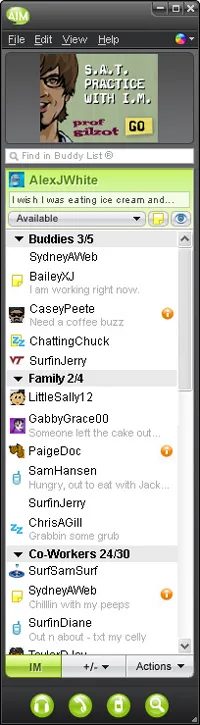
Your Buddy List was the core interface, an organized repository of IM contacts stored in your account. Upon opening AIM, you faced a main window displaying this list, segmented into default groups:
- Buddies
- Family
- Co-Workers
- AIM Bots (automated contacts for movie times, stock quotes, etc.)
You weren’t stuck with these defaults. You could create new groups by navigating to the Edit menu and selecting “Add Group.”
Managing and Adding Contacts
To expand your circle, you went to the Edit menu and selected “Add Buddy.” You would then assign the new contact to a specific group. The interface allowed for additional details, such as the person’s email address or mobile phone number, making it easier to keep track of who was who.
The status of your connections was visual and immediate. Your Buddy List clearly distinguished between who was online and who was offline. Online contacts appeared under their respective group headings. Those who were offline were tucked away at the bottom of the list in a separate group titled “Offline.”
Sending Instant Messages

Getting a message out on AOL Instant Messenger was straightforward, but the mechanics depended entirely on whether the person was already in your digital circle.
If your target was on your Buddy List, you had two quick options. You could highlight their screen name and click the IM button sitting at the bottom of the window. Or, you could just double-click their name. Either way, a dedicated chat window popped up instantly.
What if they weren’t on your list? You had to go through the main AIM menu. Select “New IM” and manually type in their screen name. The system would then try to connect you.
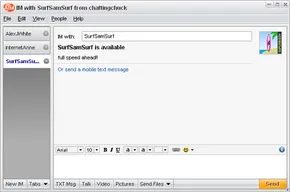
Once the window was open, the interface was minimal. You typed into a large white text box near the bottom. Press Enter or click “Send” to shoot it off. The message floated to the top half of the window. Replies appeared underneath your own text, creating a vertical thread that looked like a real conversation.
Managing Incoming Messages and Privacy
AIM wasn’t just about sending; it was about filtering. You could save entire conversations via the File menu by clicking “Save Window.” This let you pick up a thread later, preserving the context without needing to resync.
Notifications were handled with a distinct alert tone. If an unknown person messaged you, AIM didn’t just let it through silently. It paused you with a prompt: “[screen name] has sent you an IM. Do you want to read it?”
This was your gate. You could read it, ignore it, or take the nuclear option: block that screen name. Once blocked, they couldn’t contact you again. It was a primitive but effective firewall for social interaction.
Group Conversations via Buddy Chat
Need to talk to more than one person? Buddy Chat turned a 1:1 connection into a temporary group room. The setup was rigid but functional:
- Navigate to the AIM menu.
- Hover over “Chat” and select “Buddy Chat.”
- Enter the screen names of everyone you wanted to invite.
Your buddies received an invitation. They could accept or deny it. If they accepted, they joined the room.
Inside the room, the mechanics didn’t change. You typed in the box, pressed Enter, and your message went to everyone. It was a simple broadcast model. No fancy channels, no roles. Just a shared text box.
The Language of Emoticons
Text alone was often too flat for AIM. The platform relied heavily on emoticons to convey tone. There were 16 built-in smileys, ranging from silly to grumpy to flirty.
To use one, you clicked the yellow smiley face icon in the toolbar. A palette dropped down. You picked your mood, and it inserted a graphic into your message. It was a crude way to express emotion, but it defined the early web’s visual language.
Later Features for AIM


Mobile Messaging and Forwarding
The ability to text cell phones directly from AIM arrived later in the client’s lifecycle. It wasn’t automatic. You needed the recipient’s actual mobile number to make it work.
There was also IM forwarding. This feature pushed instant messages to your phone when you were away from your desktop. Activation was straightforward. Go to the main Edit menu. Click Settings. Select the Mobile tab. Register your number.
It wasn’t just a one-way street. You could reply to those forwarded IMs using text messages from your phone. This created a bridge between the desktop experience and the mobile pocket.
VoIP and Call Out Services
AIM rode the wave of Voice Over IP (VoIP) popularity. It offered free internet phone calls to other AIM users. The hardware requirement was simple. A headset with a built-in mic. Or a computer with standard speakers and a microphone.
AIM Call Out took this further. It functioned similarly to early Skype. You could dial any standard phone number directly from the AIM interface.
There was a catch. It wasn’t free. You were charged by the minute.
File Transfer Mechanics
Sharing files was a core utility of the platform. You could send single documents or entire folders to any buddy. The process was manual but effective.
- Double-click a buddy’s name to open a new IM window.
- Locate the Send Files button at the bottom of the chat pane.
- Choose either Send File or Send Folder.
- A system dialog opens. Select the target from your hard drive.
The recipient held the power. They could accept or deny the transfer. It wasn’t forced.
For visual content, AIM 6.5 changed the game. A dedicated Pictures button appeared in the IM window. Drag and drop photos directly into the chat. The software resized them automatically. They sent instantly. You could send them as individual images or a slideshow.
Social Profiles
AOL expanded social networking within AIM 6.5. Users could build public or private profile pages. These pages hosted photos, hobby lists, and external links.
You could link to your buddies’ profiles directly from your own. Access was easy. Click the AIM menu. Select Open My Profile. It turned a messaging client into a lightweight social network.
AIM Express and Other Products


Long before mobile apps made communication frictionless, people were already chasing that convenience. AOL Instant Messenger (AIM) wasn’t just a desktop client anymore. It was becoming a web service. This shift was driven by a simple desire: talk to friends without being chained to your own machine.
The Convenience of AIM Express
Enter AIM Express. It was a browser-based interface that let you send instant messages without installing or running the heavy client software. You just opened a web browser, logged in, and you were in. This was a game-changer for anyone stuck on a public computer, a library terminal, or an office PC where installing software was either impossible or prohibited.
It mirrored the desktop experience surprisingly well. Your entire Buddy List loaded instantly. Add a new friend or group while using the web version? It synced back to your main desktop installation the next time you logged in. You weren’t just messaging; you could even check your AOL Mail via two dedicated icons at the bottom of the window. It was unified. It was fast. And it worked from any computer with an internet connection.
Broadcasting with AIM Share
Then there was AIM Share. This was less about one-on-one chats and more about broadcasting. You could send a link or a message to your entire Buddy List with a single click.
The workflow was straightforward. You could visit the AIM Share website directly or install a toolbar button in your browser. Found a website you thought your friends would love? Click the button. AIM would auto-generate a message containing the site’s URL. Add a quick description, hit “Share,” and boom—everyone on your list got the link. It was an early form of social sharing, predating Twitter by over a decade.
Personalizing Your Presence: Expressions and Tunes
Your digital identity mattered. AIM Expressions was the hub for managing that identity. It handled two main components: buddy icons and wallpaper.
The buddy icon was the small image that appeared next to your name in every outgoing IM and on your profile. The wallpaper was the background image behind that icon. You could customize both through the “My Personality” box at the top of the Expressions page. Click “Change,” browse dozens of options, and update your look. If the built-in selection didn’t cut it, you could search Google for “buddy icon” and find hundreds of third-party sites offering customized graphics.
AIM Tunes offered a different kind of personalization: music. This feature allowed two users to listen to each other’s music libraries simultaneously for free. It was a social feature, letting you share what you were listening to in real-time. But it had a major limitation. It couldn’t stream DRM-protected music. This meant most MP3s bought from iTunes or Napster were off-limits. The tech worked, but the industry’s copyright locks held it back.
The Security Crackdown
All this connectivity came with a cost. Starting in January 2002, AIM became a target. Security holes were reported with alarming frequency. These weren’t just minor glitches; they were vulnerabilities that allowed hackers to take over users’ computers by infecting them with malicious code, specifically worms.
AOL responded by adding special filters to their AIM servers, closing most of the immediate threats. But the problem persisted. An article from Wired News highlighted that despite these fixes, security holes remained a significant issue for AIM. The infrastructure was exposed. The risk of a devastating, widespread worm attack was still very much on the table.
AIM Applications

Back in 2004, the Pew Internet & American Life Project reported that 11 million Americans were already using instant messaging (IM) while on the clock. Sure, some of those conversations were just idle chatter with friends. But a huge chunk of that traffic was actually people trying to collaborate. They were looking for something faster than email. Something that didn’t require picking up the phone.
AOL saw this shift. They knew their instant messenger wasn’t just a toy for teenagers anymore. So they launched AIM Pro. It was free. It was designed to be the professional cousin to the consumer version. The goal was simple: turn a chat app into a full-blown office suite.
Here is what it actually offered.
The Features That Tried to Replace Email
AIM Pro wasn’t just text on a screen. It bundled features that companies were paying good money for elsewhere.
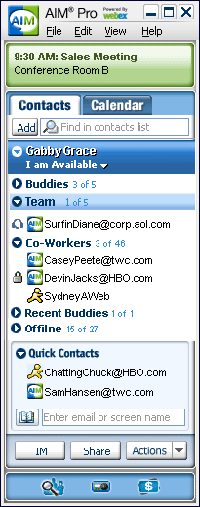
Desktop sharing was the star feature. It was powered by WebEx, which was a big deal at the time. You could show your entire computer screen to anyone logged into the conference. No more screenshots. No more “I can’t see your screen.” You just shared it.
Then there was videoconferencing. It worked similarly to the video calls in AIM 6.5. You could tack video onto any standard chat session. If you had an IM buddy, you could flip the switch and see them. It made remote work feel a little less lonely.
File sharing solved a specific headache. Emails have attachment limits. AIM Pro let you send important documents instantly. No size caps. No bouncing emails back and forth. Just send.
But the real killer app for office workers was the integration.
The Outlook Integration
AIM Pro didn’t just sit there. It talked to Microsoft Outlook. You could send, receive, and manage all your emails from within the IM interface. One window. One place to look.
It also included a built-in calendar. This synced with Outlook too. You got updates on meetings and appointments directly in your chat window. No more switching tabs to check if you have a call in five minutes.
Security was another selling point. Since WebEx powered the backend, the data traveling across the network was encrypted. For companies worried about leaks, that was a relief.
Why It Didn’t Last
It seems like a good idea now. Why didn’t it stick?
Everything ended when AOL discontinued the AIM service in December 2017. The infrastructure went dark. The features vanished. The 11 million workers who had relied on it for collaboration lost their tool overnight.
The experiment proved that people wanted communication tools that felt like communication, not like a database. But AOL moved too slow. The market shifted. Slack arrived. Teams arrived. They offered better integrations, better security, and a future that didn’t rely on a messaging app from the late 90s.
AIM Pro was ahead of its time in some ways. It understood that work happens in streams, not just in inbox inboxes. But being first doesn’t mean being last. And sometimes, being last means being extinct.
This article was updated in conjunction with AI technology, then fact-checked and edited by a HowStuffWorks editor.


